Incomplete completion menu in extended base language editors

Hi,
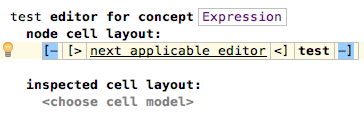
I want to provide a custom Expression editor, but as soon as I add additional elements code completion is not as expected. My editor looks as follows:
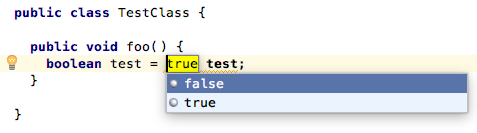
But then code completion looks as follows (i.e., code completion works only for the current type and node substitution is not available anymore).
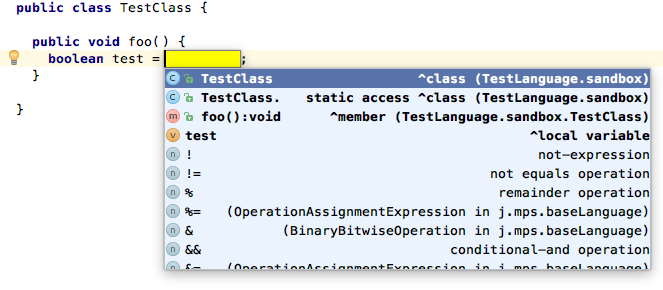
As soon as I select all elements of the current expression's editor I get the menu. However, typing and code completion is not possible/available. The situation gets even worse as soon as the editor gets more complex.
So am I missing something? Is it possible to solve the issue or is it a bug?
Cheers,
Ben
Please sign in to leave a comment.
Hi,
substitutions, by default, work when you select the whole editor. If you want substitutions to be triggered on a single cell ("next applicable editor" in your case), you need to indicate that in its "menu" property (Inspector) as follows:
menu parts:
replace node (custom node concept)
replace with : Expression
Vaclav
Thanks a lot for the quick response! Precise and helpful as always! :)
Hm, if I add the menu parts to the next applicable editor as you said substitutions still not work.
However, adding the menu parts to the constant in the editor gives me in the code a completion menu on pressing ctrl+alt (with the cursor at the constant). Any ideas?
Okay, found a workaround. The problem is that for "next applicable editor" the generator doesn't provide substitute information (editorCell.setSubstituteInfo()).
Thus, I created a custom cell provider to workaround the issue:
Benjamin, thank you for your feedback.
I've created the issue:
https://youtrack.jetbrains.com/issue/MPS-24114
It will be fixed in the next release